
Table of Contents
- How Smart Thermostats Differ From Old-School Models
- What’s Really Behind That Blank Screen? The Top 5 Culprits
- Before You Call: A Homeowner’s Diagnostic Checklist
- When to Call Sarkinen Heating & Cooling: Recognizing Complex Issues
- Keeping Your Smart Thermostat Powered: Preventive Maintenance Tips
- Key Takeaways
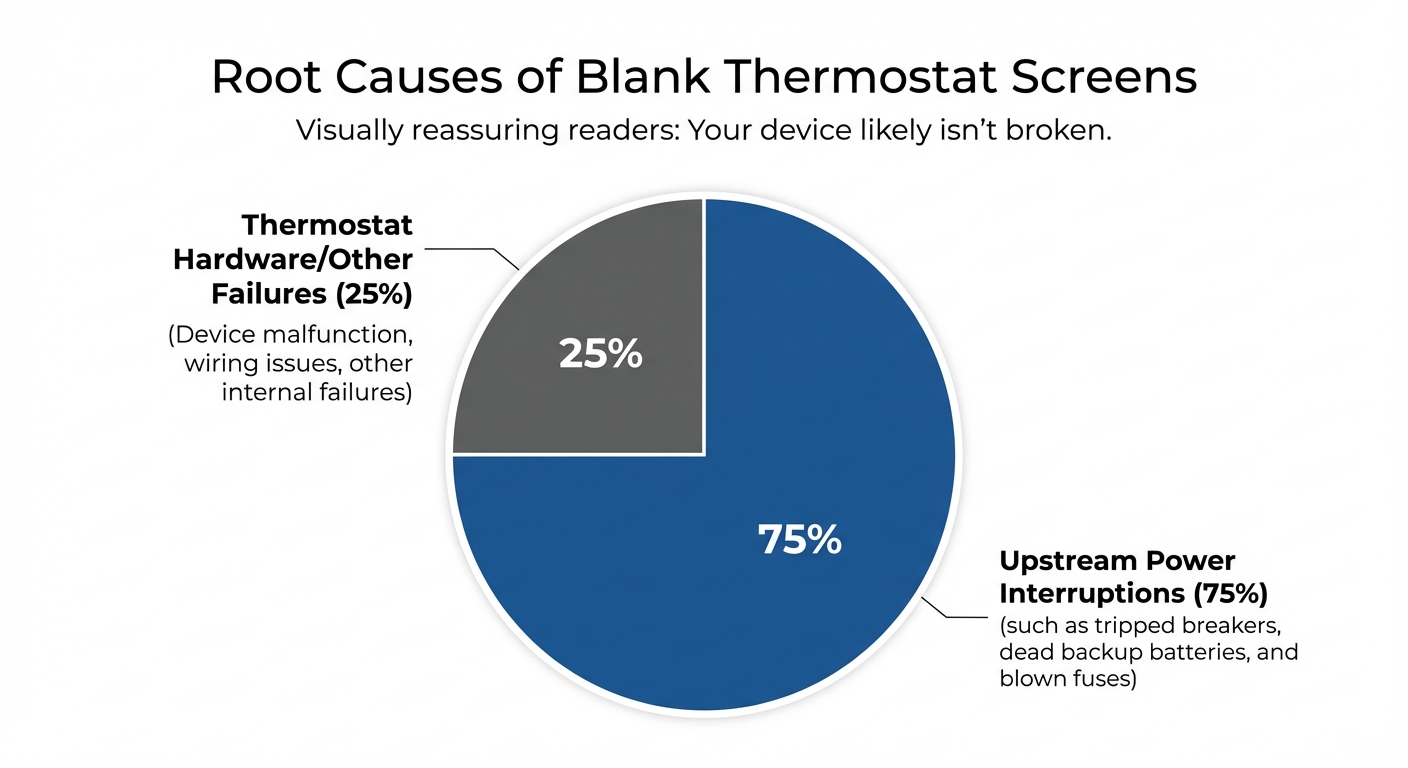
Picture this: You wake up on a cold winter morning, shivering as you realize something’s wrong. You walk over to check your thermostat, only to find the screen completely dark—no display, no response, and worst of all, no heat. Or perhaps you return home on a sweltering summer afternoon to discover your air conditioning isn’t running, and your once-reliable smart thermostat has gone entirely blank. If you’re a homeowner in Vancouver, WA or Portland, OR, this scenario is more common than you might think—and fortunately, it’s usually easier to fix than you’d expect. As smart thermostats have become increasingly popular in Pacific Northwest homes, with the market projected to grow from $2.5 billion in 2023 to $6.4 billion by 2030, more homeowners are encountering these digital display issues. Here’s the good news: over 75% of blank thermostat screens are caused by simple power interruptions, not expensive equipment failures. Many of these issues can be resolved with basic DIY troubleshooting that takes just minutes to complete. This comprehensive guide will walk you through the most common causes of blank thermostat screens, provide step-by-step diagnostic instructions anyone can follow, and help you determine when it’s time to call the professionals at Sarkinen Heating & Cooling. Whether you’re dealing with a winter freeze or a summer heatwave, understanding these troubleshooting basics will help you restore comfort to your home quickly and confidently.
How Smart Thermostats Differ From Old-School Models
Before we dive into troubleshooting, it’s essential to understand how modern thermostats work—and why they’re fundamentally different from the simple dial thermostats your grandparents used. Traditional mechanical thermostats were remarkably simple devices. They used a bi-metallic coil and a mercury switch to control your heating and cooling. These units required absolutely zero external power to operate their interface—they simply acted as a bridge to complete a 24-volt circuit from your furnace’s transformer. You could install one, and it would work reliably for decades without ever needing a battery change. Modern smart thermostats, however, are essentially small computers mounted on your wall. They feature full-color touchscreens, Wi-Fi connectivity for remote control via smartphone apps, motion sensors, learning algorithms, and continuous background processing. All of this sophisticated technology requires constant electrical power to function. This is where the critical C-Wire (Common Wire) comes into play. Smart thermostats typically require a dedicated C-Wire that provides a continuous 24-volt AC return path from your HVAC system’s transformer. Without this dedicated wire, your thermostat must resort to “power stealing”—pulsing small amounts of electricity through your heating and cooling wires—or rely heavily on backup batteries to maintain operation.
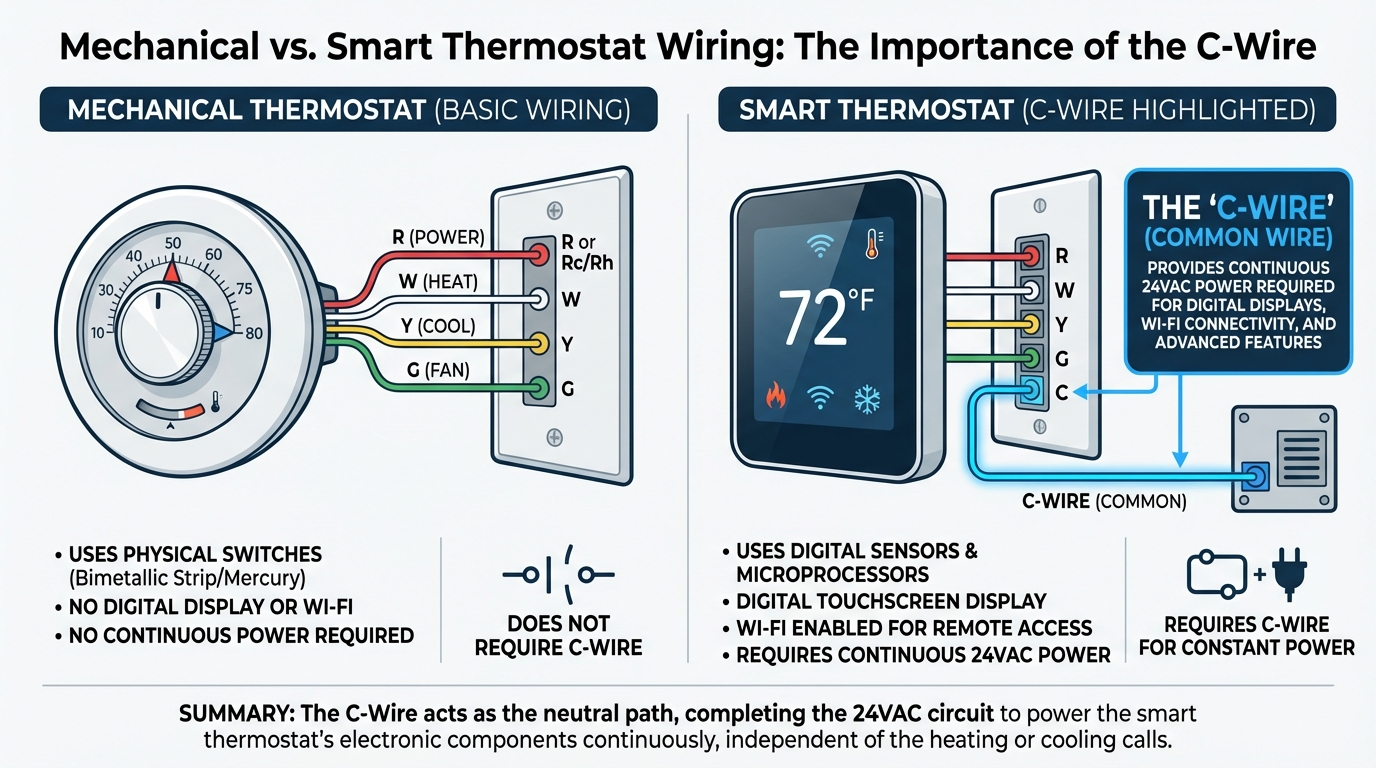
When power is interrupted—whether from depleted batteries, a tripped breaker, or a blown fuse—your smart thermostat shuts down its display to preserve critical memory and settings. This is a protective feature, not a malfunction, and understanding this distinction is the first step toward successful troubleshooting. For homeowners in the Sarkinen Heating & Cooling service area, as Pacific Northwest homes increasingly adopt smart home technology, understanding these power dependencies has become essential for maintaining year-round comfort.
What’s Really Behind That Blank Screen? The Top 5 Culprits
Understanding the root causes of a blank thermostat screen helps you diagnose issues systematically rather than immediately assuming your equipment has failed. Let’s examine the five most common culprits in order of likelihood and ease of resolution.
Cause #1: Dead or Depleted Batteries
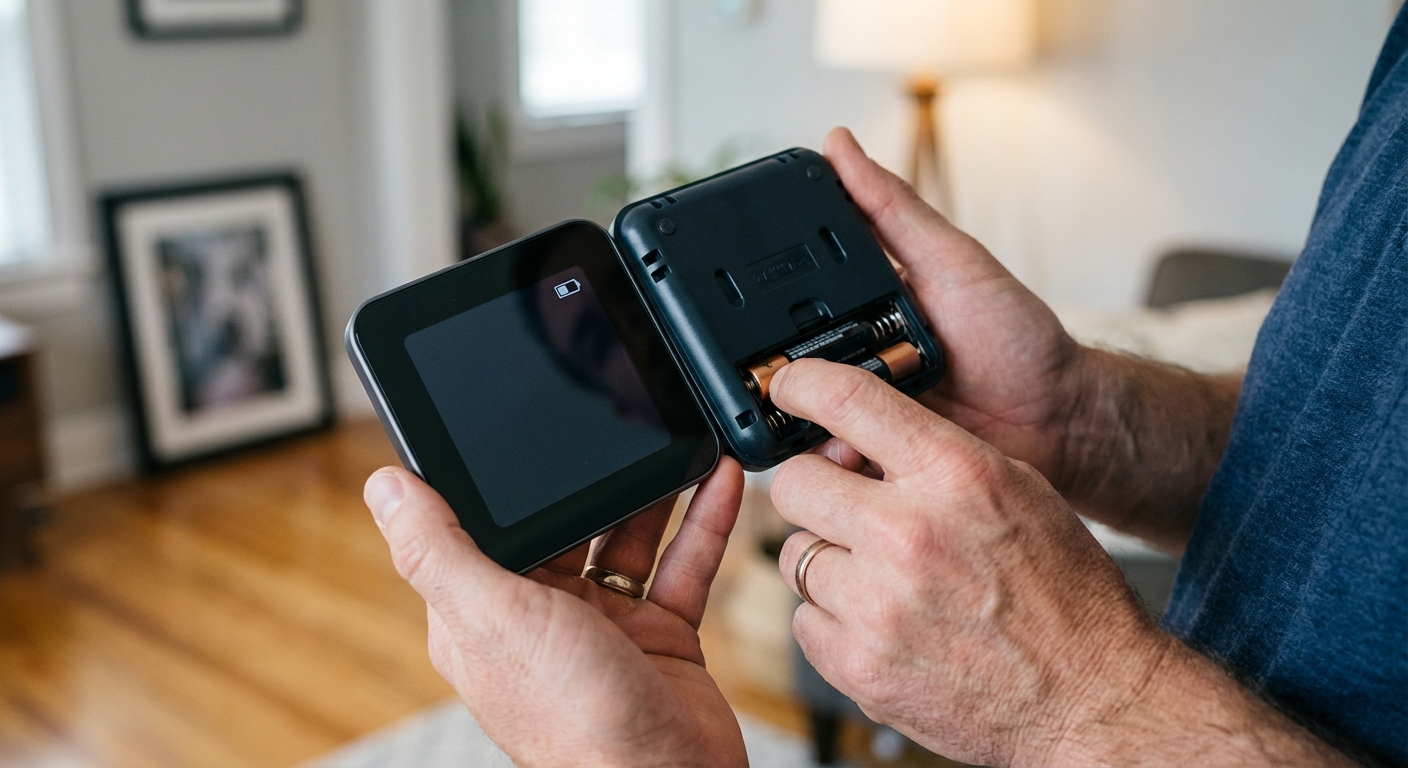
Even hardwired smart thermostats often contain backup batteries—either standard AA/AAA batteries or rechargeable lithium-ion cells. These batteries serve as a power reserve when your primary electrical supply is interrupted. When the primary power fails and your backup batteries are exhausted, the screen goes completely blank. This is the simplest and most common cause of display failure.
When to worry: If fresh batteries deplete within just a few days, this indicates a potential wiring short or a problem with the thermostat’s internal circuitry that requires professional diagnosis.
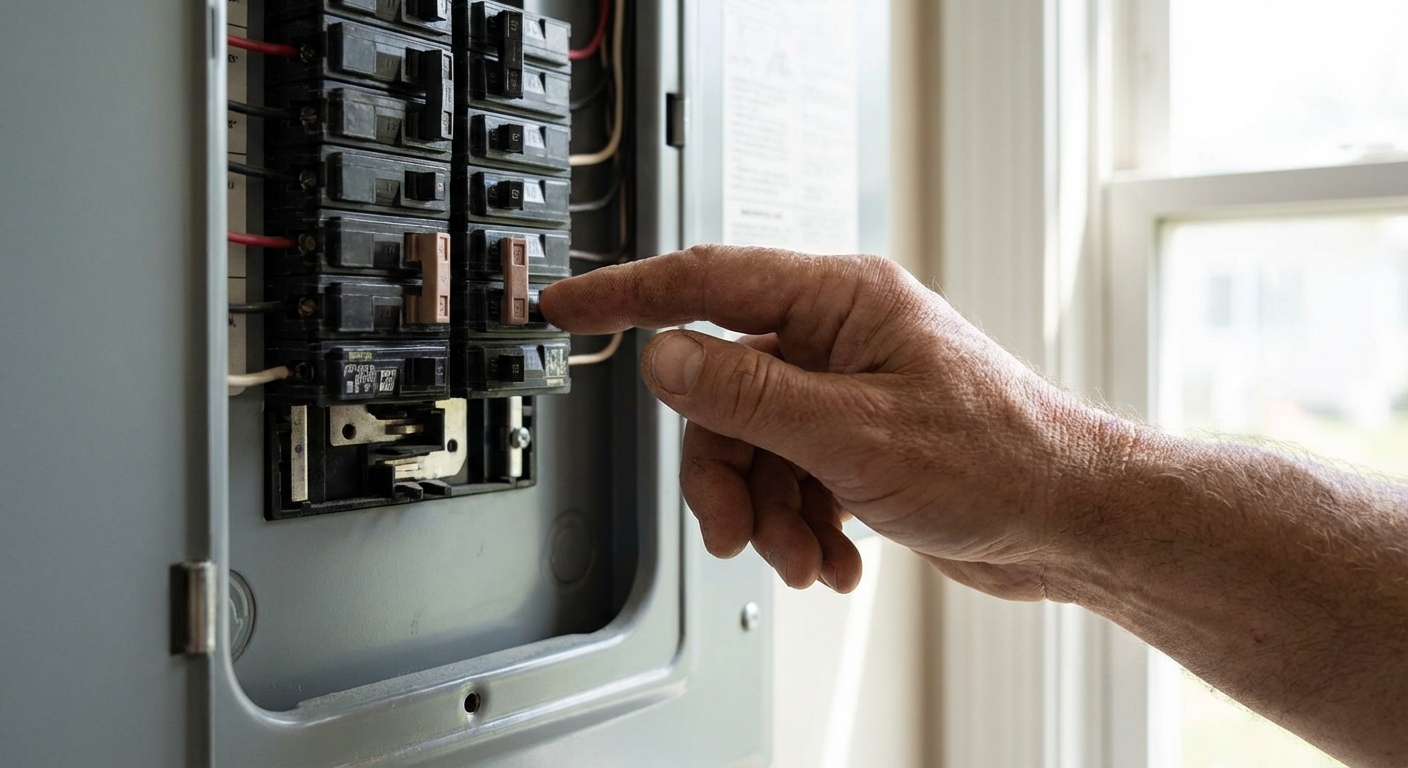
Cause #2: Tripped Circuit Breaker
Your HVAC system draws significant electrical current, especially during startup when the compressor and blower motor engage. Power surges, aging equipment, or brief electrical anomalies can trip the dedicated HVAC breaker in your home’s electrical panel. Because your thermostat’s 24-volt transformer is housed inside your furnace or air handler, a tripped breaker cuts all power to both the HVAC system and the thermostat itself.
Professional note: If the breaker trips again immediately after resetting, or continues to trip repeatedly, there’s likely a ground fault or severe electrical issue that requires expert diagnosis. Do not continue resetting a breaker that trips repeatedly—this indicates a dangerous condition.
Cause #3: Blown Furnace Control Board Fuse
Inside your HVAC unit is a control board (the electronic brain of your system) protected by a small automotive-style blade fuse. These fuses are typically 3-amp or 5-amp and are often colored purple or orange. Short circuits in your low-voltage wiring—caused by rodent damage, loose connections, wire insulation deterioration, or installation errors—will blow this fuse. This is actually a protective feature designed to sacrifice an inexpensive fuse rather than your expensive control board.
Critical warning: If you replace the fuse and it blows again immediately—or even within a few minutes—there’s an underlying short circuit that requires professional diagnosis. Continuing to replace fuses without identifying the root cause can lead to more extensive damage.
Cause #4: Tripped Condensate Safety Switch
Your air conditioning system removes humidity from indoor air as part of the cooling process, creating condensation that must drain away from your home. According to ASHRAE research, clogged condensate drains account for nearly 30% of summer HVAC emergency calls. When the drain becomes clogged with algae, mold, or debris, water backs up into a safety pan equipped with a float switch. This switch intentionally cuts power to your entire system to prevent water damage to your home—which means your thermostat loses power and goes blank.
Regional relevance: Pacific Northwest summers bring increased humidity levels, making condensate drain maintenance particularly important for homeowners in the Vancouver and Portland areas during cooling season.
Cause #5: Open Furnace Door Safety Switch
This is perhaps the simplest issue—but also one of the most commonly overlooked. Your furnace has a small safety button (usually a push-button micro-switch) that deactivates the entire system if the access panel is loose, improperly seated, or removed. This safety feature prevents the furnace from operating with the access panel open, which could expose moving parts or create a fire hazard.
Common scenario: This issue frequently occurs after homeowners change their air filters and don’t fully reseat the access panel afterward.
Before You Call: A Homeowner’s Diagnostic Checklist
This practical, sequential checklist empowers you to safely perform preliminary diagnostics, potentially saving both time and service costs. Follow these steps in order, checking whether each resolves your blank screen issue before moving to the next.
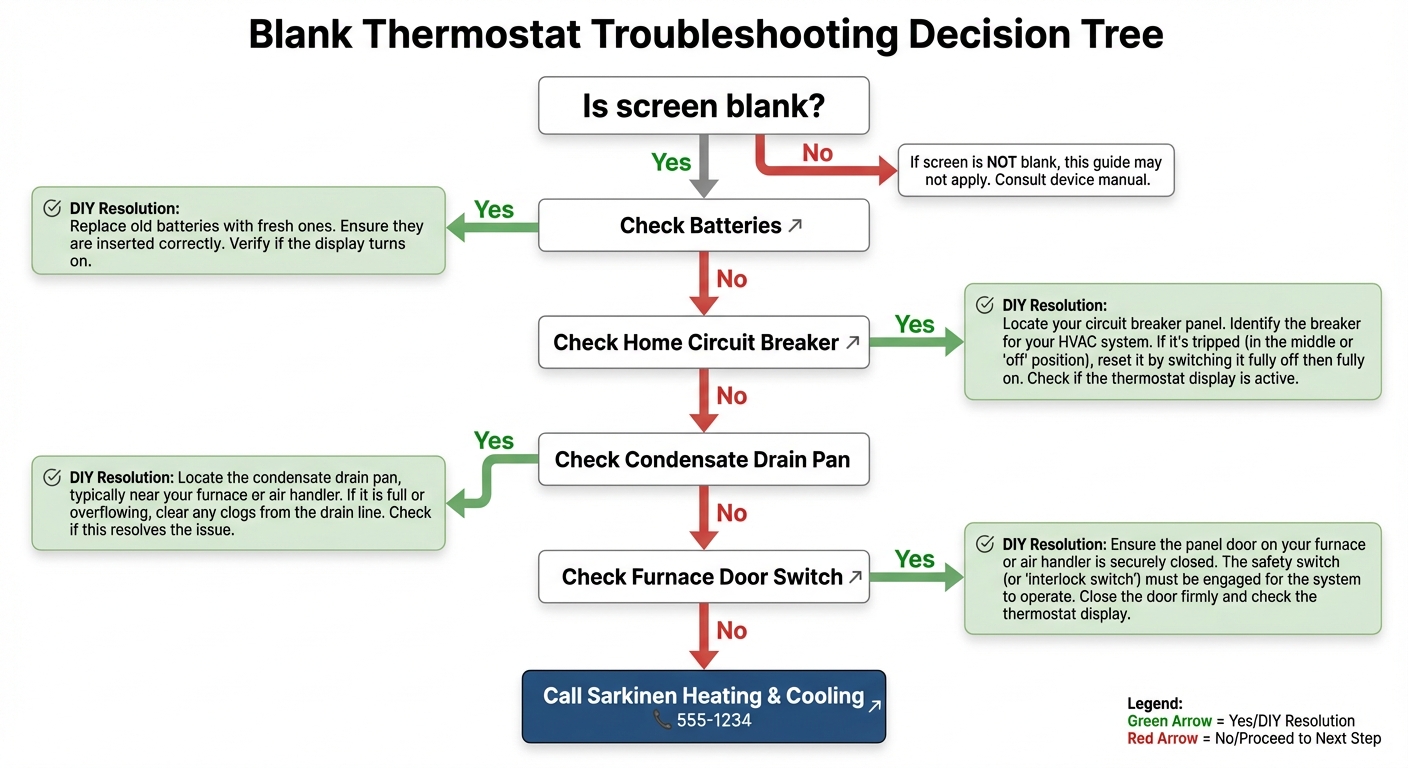
Step 1: Check the Batteries (2 minutes)
Start with the simplest solution first:
- Remove your thermostat’s faceplate by gently pulling it straight off the wall mount (some models have a small release button on the bottom or side)
- Locate the battery compartment—it’s usually clearly visible once the faceplate is removed
- Replace AA or AAA batteries with fresh ones, ensuring correct polarity (+ and – orientation)
- For models with rechargeable batteries, connect a USB cable and allow 1-2 hours of charging time
If successful: Your screen should power on within seconds. If it doesn’t, move to the next step.
Step 2: Verify Circuit Breakers (3 minutes)
Check your home’s electrical supply to the HVAC system:
- Locate your main electrical panel (circuit breaker box)
- Look for breakers labeled “Furnace,” “HVAC,” “Air Handler,” or “AC”
- Check if any are in the tripped position—they’ll appear to be between the fully on and off positions
- Firmly reset any tripped breakers by pushing them fully to the “off” position first, then back to “on”
If successful: You should hear your HVAC system power up within 30 seconds, and your thermostat screen should illuminate.
Step 3: Inspect Safety Switches (5 minutes)
Check the two most common safety switches: Condensate Pan Check:
- Locate your indoor air handler unit
- Look for standing water in the drain pan (especially important during cooling season)
- If water is present, use a wet/dry vacuum to clear the PVC drain line
- The safety switch should reset automatically once the water level drops
Door Switch Check:
- Ensure your furnace access panel is fully closed and latched
- Listen for a distinct “click” when the panel engages the switch
- Try removing and reseating the panel to ensure proper contact
If successful: The thermostat should restore power immediately when the safety condition is cleared.
Step 4: Examine the Control Board Fuse (Advanced, 10 minutes)
This step requires more caution and mechanical comfort:
- Remove the furnace access panel
- Locate the control board (usually a green or tan circuit board with multiple wire connections)
- Find the automotive-style blade fuse (often purple, orange, or red)
- Inspect for visible damage—look for blackening, a broken internal filament, or melting
- If you have a multimeter, test for continuity across the fuse terminals
Important: Only attempt this step if you’re comfortable working around electrical components. If you’re uncertain, skip to calling a professional.
When to Stop and Call Sarkinen Heating & Cooling
You should immediately contact a professional HVAC technician if:
- The circuit breaker trips again immediately after resetting (indicates a ground fault or short circuit)
- A replacement fuse blows instantly or within minutes (indicates an underlying wiring problem)
- The condensate drain cannot be cleared, or you discover the condensate pump has failed
- You’re uncomfortable performing any of these diagnostic checks
- The problem persists after completing all troubleshooting steps
- You smell burning plastic or see visible scorch marks on any components
When to Call Sarkinen Heating & Cooling: Recognizing Complex Issues
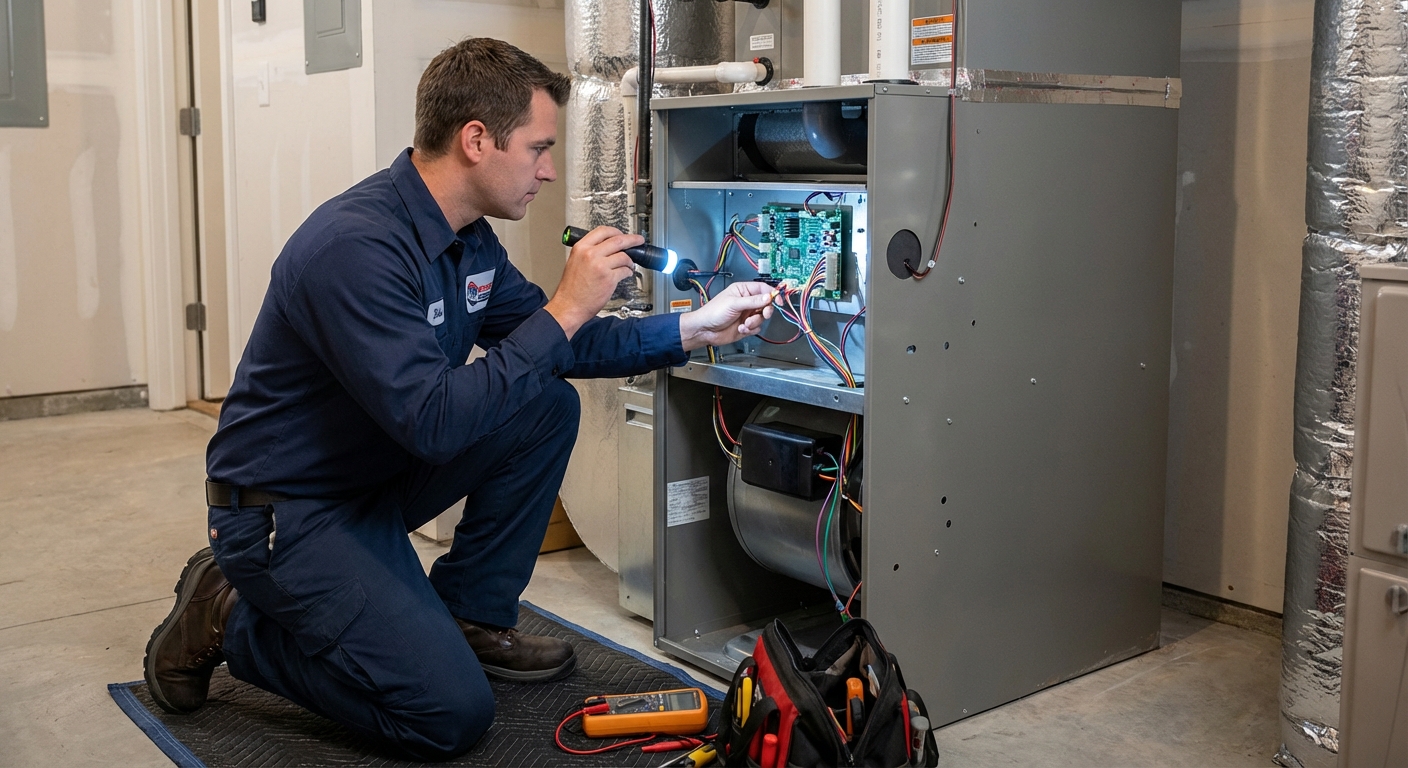
While many blank screen issues can be resolved through basic troubleshooting, certain symptoms indicate underlying problems that require professional HVAC expertise. Knowing when DIY troubleshooting should end and professional service should begin is just as important as knowing how to diagnose simple issues.
Red Flags That Require Professional Diagnosis
Repeatedly Blown Fuses:
If replacement fuses blow immediately or within hours, there’s a dangerous short circuit somewhere in your system’s wiring. This could damage expensive components like your control board, transformer, or even your thermostat itself. Continuing to replace fuses without identifying the underlying cause is like putting a Band-Aid on a broken bone—it won’t solve the real problem and may make it worse. Instant Breaker Trips:
A circuit breaker that won’t stay reset indicates a ground fault or severe electrical issue that requires licensed repair. This is a serious safety concern that should never be ignored or repeatedly bypassed. Burning Smells or Visible Damage:
Any odor of burning plastic, melted wire insulation, or visible scorch marks on the control board requires immediate professional attention. These are signs of electrical failure that pose fire hazards. Water Damage Concerns:
If the condensate overflow issue has been ongoing or severe, there may be hidden water damage to electrical components. Water and electricity are a dangerous combination, and professional inspection ensures safety. Recurring Problems:
If your thermostat screen goes blank repeatedly—even after successful resets—there’s an intermittent fault that requires diagnostic equipment to identify. These issues are often caused by loose wire connections, deteriorating insulation, or failing components that show symptoms only under specific conditions.
The Value of Professional Diagnostics
HVAC technicians bring specialized tools and expertise that go far beyond consumer-level troubleshooting:
- Diagnostic Equipment: Multimeters, amp clamps, thermal imaging cameras, and pressure gauges can identify issues invisible to the naked eye
- System Knowledge: Professional technicians understand the complex interactions between your thermostat, control board, transformer, and HVAC equipment
- Safety Expertise: Working with electrical systems and HVAC equipment carries inherent risks for untrained individuals
Research by Pacific Northwest National Laboratory found that empowering homeowners with basic diagnostic checklists reduces unnecessary contractor dispatch by up to 20%. This allows companies like Sarkinen Heating & Cooling to prioritize truly complex repairs during peak demand seasons—meaning faster service when you genuinely need professional help.
What to Expect from a Service Call
When you contact Sarkinen Heating & Cooling for professional diagnostic service, our technicians will:
- Perform comprehensive electrical system testing to identify voltage irregularities or wiring problems
- Inspect all low-voltage wiring and connections for damage, corrosion, or improper installation
- Conduct control board diagnostic testing to verify proper operation of all components
- Verify and calibrate safety switches to ensure they’re functioning correctly
- Provide a complete system performance evaluation to identify potential issues before they cause failures
Professional service ensures not only that your immediate problem is resolved, but that your entire HVAC system is operating safely and efficiently.
Keeping Your Smart Thermostat Powered: Preventive Maintenance Tips
Proactive maintenance significantly reduces the likelihood of unexpected thermostat failures and extends your HVAC system’s longevity. Here’s a practical seasonal maintenance approach tailored specifically for Pacific Northwest homeowners.
Spring (Pre-Cooling Season)
As temperatures begin to rise and you prepare to use your air conditioning:
- Clear condensate drain lines before humidity season begins—use a wet/dry vacuum or pour a vinegar-water mixture down the line
- Test float switch operation by pouring water into the drain pan to ensure the safety switch activates properly
- Replace backup thermostat batteries annually—even if they still work, fresh batteries prevent unexpected failures
- Verify C-Wire connections are secure—gently tug on wires at both the thermostat and the furnace to ensure solid connections
Fall (Pre-Heating Season)
Before winter arrives and you rely heavily on your heating system:
- Vacuum around your furnace to prevent dust accumulation on the control board and electrical connections
- Test the furnace door safety switch by carefully opening and closing the access panel while the system is calling for heat
- Check for rodent activity in utility areas—damaged wiring from mice or rats is a leading cause of blown fuses
- Schedule professional HVAC inspection—fall is the ideal time for a tune-up before the heating season begins
Smart Thermostat-Specific Care
Beyond general HVAC maintenance, your smart thermostat needs attention too:
- Keep firmware updated—manufacturers often release updates that improve power management and fix bugs
- Clean touchscreen surfaces with appropriate cleaners designed for electronics (avoid harsh chemicals that can damage the screen)
- Monitor battery replacement notifications in your thermostat’s smartphone app
- Document any recurring error codes or unusual behavior to share with technicians if professional service becomes necessary
Professional Maintenance Value
According to the U.S. Department of Energy, regular HVAC maintenance can improve system efficiency by up to 15%, which translates directly to lower energy bills and extended equipment life. Sarkinen Heating & Cooling offers comprehensive maintenance plans that include:
- Electrical connection inspection and tightening to prevent power interruptions
- Control board cleaning and testing to identify potential failures before they occur
- Safety switch verification to ensure proper operation
- Complete system diagnostics that catch small problems before they become expensive repairs
Regional Considerations for Pacific Northwest Homes
The Vancouver and Portland climate presents unique maintenance challenges:
- Higher humidity during summer months increases the importance of condensate drain maintenance—our region’s dampness promotes algae and mold growth in drain lines
- Temperature fluctuations place additional stress on HVAC electrical components as systems cycle on and off more frequently
- Older homes may lack proper C-Wire installations, making backup battery maintenance absolutely critical for smart thermostat reliability
Key Takeaways
A blank thermostat screen is almost always caused by power interruptions—not thermostat failure. In the vast majority of cases, systematically checking batteries, circuit breakers, safety switches, and control board fuses can restore functionality quickly and easily. By following the troubleshooting checklist provided in this guide, Vancouver and Portland homeowners can often resolve these issues independently, saving both time and service costs while gaining confidence in managing their home comfort systems. Understanding the basics of how your HVAC system delivers power to your thermostat doesn’t require an engineering degree—just a willingness to learn and a systematic approach to problem-solving. However, recognizing when DIY troubleshooting should end and professional service should begin is equally important. Complex electrical issues, recurring faults, safety concerns, or situations where you’re simply uncomfortable working around electrical equipment always warrant expert intervention. Sarkinen Heating & Cooling serves the greater Vancouver, WA and Portland, OR area with transparent, educational service that empowers homeowners while providing expert solutions when needed. We believe in teaching our customers to understand their HVAC systems while being available 24/7 when professional expertise is required. Armed with the knowledge in this guide, you’re better prepared to maintain home comfort year-round while recognizing when it’s time to call in the professionals. A few minutes of systematic troubleshooting can often restore your thermostat to working order—but if the problem persists or you encounter any of the warning signs discussed, don’t hesitate to reach out.
Need Professional Help?
If you’ve worked through this checklist and your thermostat screen remains blank, our experienced technicians are ready to help diagnose and resolve even the most complex HVAC electrical issues.
Call us today:
Vancouver: (360) 940-0305
Portland: (503) 606-8419
References:
- U.S. Energy Information Administration (EIA). (2023). Residential Energy Consumption Survey (RECS) – Pacific Region Data. Retrieved from https://www.eia.gov/consumption/residential/
- Fortune Business Insights. (2023). Smart Thermostat Market Size, Share & Industry Analysis. Retrieved from https://www.fortunebusinessinsights.com/industry-reports/smart-thermostat-market-100799
- U.S. Environmental Protection Agency – ENERGY STAR. (2024). Smart Thermostats: How They Work and Power Requirements. Retrieved from https://www.energystar.gov/products/smart_thermostats
- U.S. Department of Energy. (2023). Common Air Conditioning Problems. Retrieved from https://www.energy.gov/energysaver/common-air-conditioning-problems
- Building America Solution Center, U.S. Department of Energy. (2023). Condensate Drainage and Safety Switches. Retrieved from https://basc.pnnl.gov/resource-guides/condensate-drainage
- American Society of Heating, Refrigerating and Air-Conditioning Engineers (ASHRAE). (2022). HVAC System Maintenance and Preventative Diagnostics. Retrieved from https://www.ashrae.org/technical-resources/
- Pacific Northwest National Laboratory (PNNL). (2021). Fault Detection and Diagnostics in Residential HVAC. Retrieved from https://www.pnnl.gov/building-controls-and-diagnostics
- U.S. Department of Energy. (2023). Maintaining Your Air Conditioner. Retrieved from https://www.energy.gov/energysaver/maintaining-your-air-conditioner